A Friendly CAD Classroom in Your Pocket
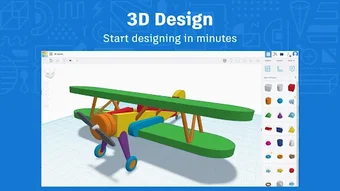
Tinkercad from Autodesk is a free 3D design app that brings the platform’s beginner-friendly approach to mobile. It is built for students, educators, hobbyists, and first-time makers who want an accessible place to explore 3D modeling, coding, and design basics without jumping into a heavy professional CAD tool.
Top Recommended Alternative

The app stands out for keeping things approachable while still offering real hands-on tools. Users can create models, work with Codeblocks, and move projects in and out through common formats such as STL, OBJ, and SVG. That makes it more than a simple viewer, even if the smaller-screen experience can feel tighter than the web version.
Where Simple Shapes Turn Into Real Ideas
Tinkercad works best as an entry point to 3D modeling. Its interface is designed to lower the barrier for beginners, making it easier to build objects from simple shapes and understand how digital design fits into 3D printing. That ease of use is one of its biggest strengths, although users with advanced CAD needs can hit its limits faster than they would in more technical design software.
Another advantage is its broader learning focus. Tinkercad is not only about modeling, since Autodesk also positions it around electronics and coding. The mobile version especially highlights Codeblocks support, which helps it feel like a practical STEM learning tool instead of a one-note design app. At the same time, some parts of the wider Tinkercad ecosystem are still more naturally suited to the web experience.
The app also handles useful import and export options, which gives it more creative flexibility than the sys-gen draft suggested. Being able to work with STL, OBJ, and SVG files makes it easier to connect projects to printers, classrooms, and other workflows. The tradeoff is comfort: mobile access is convenient, but detailed work can feel cramped compared with using Tinkercad in a browser on a larger screen.
Best for Learning, Better on Bigger Screens
Tinkercad is easy to recommend for beginners who want a free, welcoming path into 3D design and creative problem-solving. It gives users real building tools, helpful coding support, and file handling that connects nicely to 3D printing projects. Its main weakness is not a lack of features, but how those features feel on a phone. For learning, experimenting, and classroom use, though, it remains one of the friendliest places to start.